
Best School Management Software: Features & Comparison Guide
This blog guides school leaders in selecting school management software, explains why these systems matter, outlines what modern ERP/cloud solutions offer, and shows how to compare vendors. It outlines core and advanced features to prioritize, argues that cloud deployments are usually best for access, lower IT burden, and faster updates, and warns of common pitfalls like buying on demos or neglecting change management. Practical advice includes a step‑by‑step selection process, trial checklists, implementation tips, success metrics, and cost considerations. A brief spotlight on Vidyanova highlights a user‑focused approach. The purpose is to help schools evaluate, pilot, and adopt the right system with confidence.
Deciding which school management software is the best for you can feel overwhelming. Platforms like Vidyanova provide schools with an all-in-one solution to manage admissions, attendance, fees, communication, and academic records from a single dashboard. dime and dabbing with mille, feuille glittered boxes. First of all, you need a tool that saves pilot time, keeps parents happy, and simplifies the lives of teachers and office personnel. Furthermore, you will want it to be compact, safe, and very simple to use with no big interruptions. I have guided a few schools through the very same journey, and it would be a pleasure for me to share the ins and outs of the whole process, alongside what really matters, what issues would need to be looked at, and how systems comparison is done so that you can decide on the most effective school management software for your school.
Why a management system for a school is a big deal
Effectively, a school management system is a software that manages the administration panel of the school in a digital form. Admissions, attendance fees, collection timetables, reports, and parent communication are examples. Getting your hands on such a system, you can say goodbye to the staff enduring the nightmare of switching from one spreadsheet to paper files to last, minute phone trees.
In my opinion, the advantages are quite simple and quite logical. You are making a smaller number of errors, your reaction times become shorter, and your records become more transparent. Members of your team will have less time spent on searching for information and more time devoted to student support. Parents get timely updates and fewer calls. Leaders get a real time view of what is happening across the school. That visibility alone makes decision making simpler.
What to expect from modern school ERP software
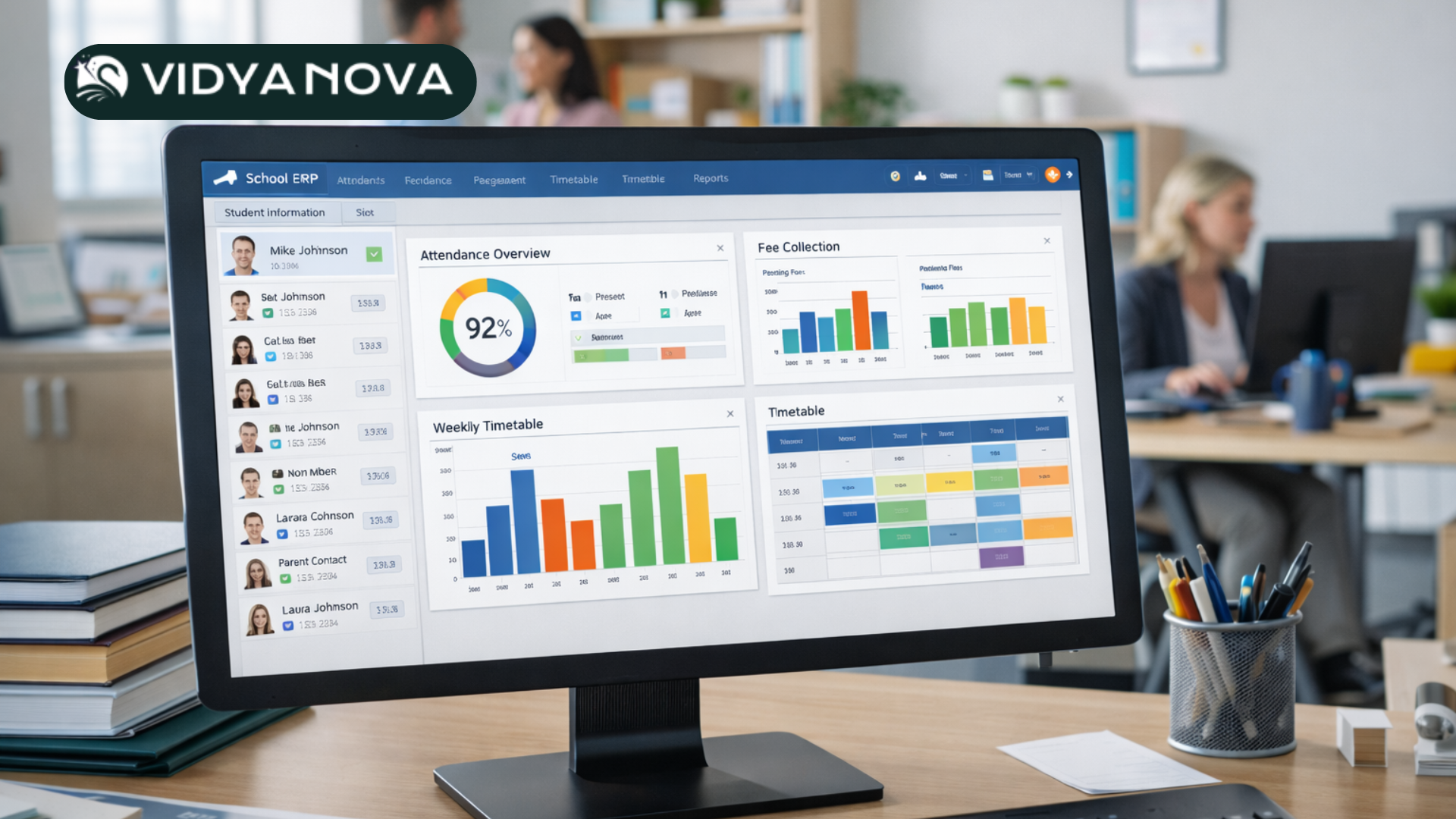
School ERP software combines core administrative tools into one platform. If you hear vendors say school ERP system for educational institutes, they mean a system that handles multiple areas in a single place. Features vary, but the best school ERP software includes:
- Admissions and enrolment management
- Student information system with profiles and academic history
- Attendance tracking for students and staff
- The timetable builder and classroom scheduling
- Fee management and online payments
- Gradebooks and report cards
- Parent and teacher communication channels
- Human resources and payroll for staff
- Library, transport, and inventory modules
- Reports, dashboards, and analytics
- Integration with learning management systems
Not every school needs every module. The trick is to find software that covers the essentials now and scales when you need it.
Why cloud based school management software wins most times
Cloud school ERP for school administration has become the default choice. Here is why most schools move to the cloud.
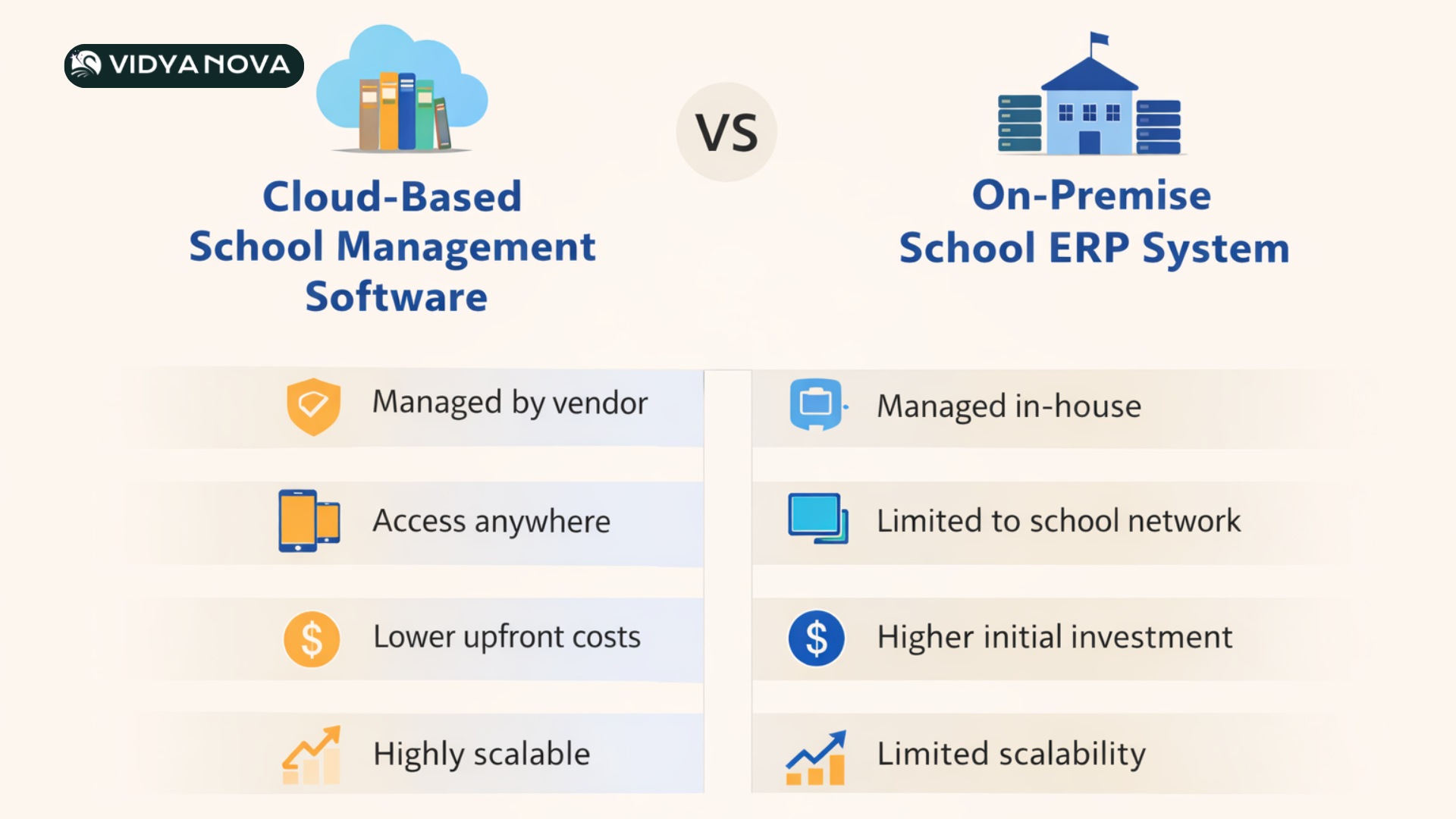
- Access anywhere. Principals, teachers, and parents can log in from their phones or home computers. That flexibility matters when someone needs a quick report before a meeting.
- Lower IT burden. You do not need servers or a dedicated technician to keep the system online. Updates happen in the background.
- Faster rollout. New features get delivered faster. You do not wait months for an on site upgrade.
- Security and backups. Reputable vendors handle backups and disaster recovery, so you do not lose data if a laptop breaks.
That said, check the vendor’s compliance and data residency policies. Some schools have local regulations and need reassurance about where data is stored.
Core features to look for in the best school management software
When you evaluate solutions, start with the basics. These features make up day to day operations and should work smoothly from day one.
- Student information system that stores personal details, academic records, health notes, and emergency contacts.
- Attendance with simple mark and reports. Bonus points for biometric or mobile scanning if you need it.
- Fee and finance module that handles billing, receipts, concessions, and reconciliation. Online payments are essential now.
- Timetable and scheduling that avoids clashes and helps with room allocation.
- Parent communication through SMS, email, or in app notifications. Parents should get attendance alerts and fee reminders without extra work for staff.
- Report cards and gradebooks that support different curricula and grading styles.
- Reports and dashboards for leaders to spot trends and act fast.
If a vendor does these poorly, extra modules will not save you. Make sure the basic workflows feel natural to your staff during a trial.
Advanced features that add real value
Some features are nice to have and can make a big difference depending on your school size and needs.
- Learning management system integration so teachers can share assignments and grades without double entry.
- Transport tracking that shows bus routes, stops, and student pickup status.
- HR and payroll are linked to attendance for automated payroll calculations.
- Library management with barcodes and fines tracking.
- Custom workflows for approval processes like leave requests or inventory purchases.
- Mobile apps for teachers and parents. Real time push notifications beat daily newsletters.
- Role based permissions so staff only see what they need.
Think about which of these solves real pain points for you. If transport is a headache, prioritize that. If payroll keeps bogging down HR, pick a system with HR features.
How to compare school management software: a practical guide
You could get lost in feature lists. Instead, use a short checklist to compare vendors side by side. In my experience, this avoids feature paralysis and keeps the decision practical.
- Core fit: Does the system handle your main processes now?
- User experience: Is the interface clean and intuitive for staff and parents?
- Integrations Will it integrate with your existing LMS, accounting software, or identity provider?
- Implementation support: Does the vendor offer on site training, data migration help, and change management support?
- Cost and total cost of ownership. Ask for setup fees, per user fees, and long term costs. Watch out for hidden costs like SMS credits or integration charges.
- Security and compliance. Can the vendor show certifications and a clear policy on data privacy?
- Scalability: Will it handle more students as you grow?
- Customer references: Can the vendor put you in touch with similar schools?
Shortlist three vendors and run a trial. Involve at least one teacher, one admin staff, and a parent in the trial so you see real world feedback.
Simple comparison categories to weigh options
When you map vendors, rate them across these categories. Keep ratings simple, like low, medium, or high. This keeps the process honest and prevents decisions based on demos alone.
- Functionality for core admin tasks
- Ease of use for non technical staff
- Quality of mobile apps for parents and teachers
- Speed and reliability
- Integration capability
- Vendor support and training
- Price transparency
- Data security
For example, a system might score high on features but low on ease of use. If teachers resist it, adoption will stall. I always prioritize usability over having every possible feature.
Common mistakes schools make when choosing software
I have seen the same missteps more than once. Avoid these to save time and money.
- Buying based on a demo alone. A slick demo hides complexity. Give staff real tasks to test.
- Choosing too many features. You do not need every module on day one. Start with essentials and activate extras later.
- Ignoring change management New systems fail when staff do not know how to use them. Plan training and follow up coaching.
- Underestimating data migration. Moving records out of spreadsheets takes time. Allow for data cleanup and validation.
- Overlooking integrations. If your LMS or accounting system will not connect, you lose efficiency.
- Not checking references. Talk to similar schools about support quality and uptime.
These pitfalls are avoidable when you plan. Allocate time for pilot runs and include users in the selection process. That investment pays off in adoption.
How a typical selection process looks
Here is a practical step by step you can follow. I use this template with schools, and it helps keep stakeholders involved.
- Define your must have list and your nice to have list
- Estimate budget and timeline
- Invite 5 to 7 vendors to submit proposals
- Shortlist 3 vendors and run short pilots with real data
- Collect feedback from teachers, admin staff, and parents
- Check references and contract terms
- Plan implementation and training
- Set success criteria and pilot dates
Quick example. If admissions and fee collection are your pain points, run a two month pilot focusing on those modules. Do not try to implement HR and library at the same time.
Pricing and affordability
Price structures vary. Some vendors charge per student. Others charge a flat school fee plus per module costs. Cloud based school management software often uses subscription pricing, which is easier to budget for. If you want a clear understanding of pricing and available modules, you can explore the Vidyanova pricing and product details to see how the platform fits different school sizes and budgets.
A few tips to avoid sticker shock:
- Ask for a full price breakdown, including setup, migration, training, and optional modules.
- Clarify costs for SMS, payment gateway fees, and APIs.
- Project three year costs, not just first year fees.
- Negotiate pilot pricing. Many vendors will reduce fees for a paid trial if you commit to a timeline.
Affordable school management software for schools exists. Price is less important than fit and long term savings. If automation reduces manual work, you often recoup the cost in months.
Security, privacy, and compliance
Schools handle sensitive data. Make sure your vendor takes this seriously. Ask these questions during shortlisting:
- Where is data hosted and who has access?
- What encryption standards do you use for data at rest and in transit?
- Do you have backups and a disaster recovery plan?
- Are you compliant with local data protection regulations?
- Can we export our data in a standard format if we need to switch vendors?
If you do not get straightforward answers, look elsewhere. Security is not a place to compromise.
Implementation tips and real world advice
Deploying new school administration software is as much about people as technology. Here are practical tips that help projects succeed. If you want to explore more insights about digital education tools, visit the Vidyanova Blog where we regularly share practical guides for schools adopting modern technology.
- Start small. Roll out core modules first and expand after staff are comfortable.
- Identify champions. Pick a teacher and an admin person to lead adoption. Give them time to learn the system deeply.
- Train in waves. Do short hands on sessions instead of long classroom training. People remember doing tasks more than listening to slides.
- Communicate with parents. Send simple guides and short videos. Address common questions proactively.
- Keep data clean. Before migration, tidy spreadsheets. Consistent naming and date formats save hours.
- Set measurable goals. For example, reduce invoicing time by X days or cut attendance corrections by X percent. Track these metrics.
One school I worked with started with admissions and fees only. After three months, they expanded to attendance and parent messaging. Staff felt confident, and adoption rose quickly. That phased approach reduces risk and builds trust.
Examples of simple workflows that make a big difference
Let me share a few small examples that show how a school management system changes daily routines.
- Online admissions form saves the admissions officer from entering data twice. The form feeds into student profiles and triggers a fee invoice automatically.
- Daily attendance push sends an automatic alert to parents if a student is absent. That reduces calls to the office and keeps parents informed.
- Automated fee reminders email and text parents before due dates and after missed payments. Cash flow stabilizes, and manual follow up drops.
- One teacher gradebook lets teachers enter marks once. Reports and transcripts populate from the same source.
These are small changes. They add up. And they do not require a complex rollout or expensive training.
Comparison snapshot: cloud vs on premise vs hybrid
Here is a simple way to think about deployment options.
- Cloud based school management software is easiest to deploy and maintain. It works well for most schools and avoids large upfront hardware costs.
- On premise solutions give you full control over servers and data, but need IT staff and regular maintenance. This can work for very large institutions or where regulations demand it.
- Hybrid setups keep sensitive data on site while using the cloud for other functions. This adds complexity but can solve specific compliance needs.
For most schools looking to digitize operations, cloud solutions are the practical choice. They are scalable, affordable, and faster to get running.
Spotlight: Vidyanova as an all in one option
If you are exploring modern school management solutions, you will come across Vidyanova. They offer a cloud based school management software that bundles core modules into one platform. In my experience, Vidyanova focuses on usability and practical workflows rather than overwhelming schools with features they will never use.
Vidyanova includes admissions, attendance, fee management, timetable, report cards, and parent communication. It also supports integrations with learning platforms and payment gateways. The vendor emphasizes implementation support and training, which matters when you are switching from manual systems.
What I like about Vidyanova is the emphasis on simple onboarding and clear pricing transparency. They also provide a demo environment so your staff can try real tasks. That helps you evaluate fit before signing on.
How to evaluate Vidyanova or any other vendor in a trial
Ask these practical questions during your trial or pilot. They will reveal whether the system will work day to day.
- Can teachers take attendance in under 30 seconds per class?
- Does the fee module match our invoicing rules and concessions?
- Can we send a parent message to a whole class in two clicks?
- Will the system export our student data in CSV format?
- How quickly does support respond during school hours?
Short trials with a few real users expose friction fast. If something takes too many clicks, staff will avoid it. Ease of use matters more than a long feature list.
Measuring success: what to track after implementation
Set realistic metrics to measure impact. These do not need to be complex. Here are a few that matter.
- Time spent on admissions and fee processing before and after implementation
- Number of manual corrections needed for attendance and grades
- Parent engagement measured by login rates or response to messages
- Fee collection cycle time and late payments
- Staff satisfaction with the system is measured in short surveys
Share early wins. A few quick improvements help build momentum and justify further rollout.
Frequently asked questions
Below are short answers to common questions I hear when working with decision makers.
Q. How long does implementation take?
A. It varies. For core modules, expect 6 to 12 weeks from sign off to live. Larger rollouts take longer. Plan for data cleanup and training time.
Q. Will staff resist the change?
A. Some will. That is normal. Choose champions, keep training short and practical, and show quick benefits like fewer phone calls or faster reports.
Q. What if we want to switch vendors later?
A. Ask about data export at the start. Make sure you can export student records and financial data in common formats. That keeps options open.
Final checklist before you sign
Use this quick checklist to avoid last minute surprises.
- We tested essential workflows with real users
- We reviewed total costs for three years
- We checked data security and compliance
- We confirmed support levels and SLAs
- We planned a phased rollout with training dates
- We set measurable success criteria
If you can tick these boxes, you are ready to move from pilot to full rollout with confidence.
Helpful links and next steps
If you want to see a real system in action and test workflows with your own data, take the next step.
Choosing school management software is a big decision. It changes how people work and how parents and students experience your school. Start with clear priorities, involve the right people, and run practical pilots. With the right approach, you will find a system that saves time, improves communication, and helps your school run more smoothly.