Online School Management Software: Cloud-Based School Solutions
This blog argues that cloud-based school management software simplifies administration, improves transparency, and saves time. It explains benefits—accessibility, lower upfront costs, automatic updates, scalability, security—and lists core modular features (SIS, attendance, fees, timetabling, LMS integration, communication, exams, HR, transport, library, analytics). It describes how automation reduces manual work, speeds fee reconciliation, improves parent engagement, and enables audits. The post covers security, integrations, implementation steps with practical tips (pilot, training, data migration), common mistakes, ROI metrics, budgeting tips, and a before/after example. It concludes by recommending measured rollout, invites school leaders to demo Vidyanova’s cloud solution, and shows simple success stories.
Running a school today feels like juggling a dozen tasks at once attendance, fees, timetables, exams, parent communication, and staff payroll. It all adds up quickly. If you've been considering a shift to VidhyaNova, you're not alone. In my experience, schools that make the move to a cloud-based solution like VidhyaNova see real improvements in efficiency, transparency, and overall peace of mind.
This post walks you through why cloud-based school management systems matter, what modules to look for, how automation actually helps, and common traps to avoid. I’ll share practical tips I’ve learned from working with school leaders and IT teams. If you want a reliable partner, Vidyanova builds education management systems used by schools moving from paper and spreadsheets to digital school solutions.
Why choose a cloud-based school management system?
Cloud-based school software removes the heavy lifting. You don't need on-prem servers, complicated updates, or constant backup worries. The vendor manages uptime, security patches, and storage. That matters for school administrators who prefer to focus on students and teachers, not system maintenance.
Here are the biggest reasons schools switch to cloud-based solutions.
- Accessibility and flexibility. Staff, parents, and students can access the student information system from anywhere, on any device. Want to check attendance on your phone at home? Easy.
- Lower upfront costs. Cloud school ERP software usually runs on subscription. That reduces capital spending on hardware.
- Automatic updates. You get feature improvements and security patches without scheduling full IT downtime.
- Scalability. The same system can serve a small campus or a network of schools. You pay for what you use.
- Security and backups. Reliable vendors offer encrypted data storage, role-based access, and regular backups. You still need policies, but it’s better than a USB stick under a headmaster’s desk.
One quick aside. Cloud does not mean you hand over control. Good providers let you define who sees what, and offer exportable backups for peace of mind.
Core modules of an online school management software
Most education management systems are modular. You can pick what you need now and grow later. Below are the modules I recommend evaluating first, with simple examples of how they help day to day.
Student Information System (SIS)
This is the heart of any school administration software. It stores personal details, admissions, attendance history, academic records, and guardians' contacts. Think of it as the master record for each student.
Example: When a parent calls to ask about past exam results, your admin can pull it up in seconds instead of searching paper files.
Attendance management system for schools
Attendance is surprisingly time consuming if you do it by hand. A digital attendance module reduces errors and speeds up reporting. Some systems support biometric, RFID, or simple teacher roll calls on mobile.
Tip: Use automatic alerts. If a student is absent without notice, the system can text parents. That small step cuts follow up time and improves student safety.
School fee management software
Fees are where most administrators feel the pain. An online fee module automates invoices, receipts, late fee rules, concessions, and online payments. Integration with payment gateways makes life easier for parents and reduces cash handling at the office.
I’ve noticed schools that digitize fees cut reconciliation time dramatically. It’s not magic, it’s fewer spreadsheets and fewer human errors.
Timetable and scheduling
Managing classroom allocation, teacher availability, and substitute coverage becomes easier with automated scheduling. Modern systems can detect clashes and suggest fixes.
Learning management integration
Distance learning or blended learning works best when the LMS plays nicely with your school ERP software. Look for platforms that sync student groups, assignments, and grades between systems so teachers don’t do duplicate work.
Communication tools and parent portal
Built-in messaging, SMS, and email reduce the need for multiple apps. Parents want a single place to check attendance, fees, and announcements. A parent portal improves transparency and reduces the number of repetitive phone calls your office gets.
Exams, gradebook, and report cards
Automated gradebooks speed up result processing. You can define weightages, set up continuous assessments, and publish report cards with a click. This module often ties into analytics that show class or subject trends.
HR, payroll, and staff management
Teachers and support staff need a place for attendance, leave, payroll, and performance records. Bridging HR with payroll eliminates duplicated forms and simplifies statutory compliance.
Transport and route management
Keeping track of buses, routes, students who board, and live tracking adds safety and peace of mind. When parents can see expected bus arrival times, they worry less and call the office less.
Library and inventory
Digital checkouts, overdue notices, and inventory tracking reduce loss and make the library friendlier for students and librarians.
Reports and analytics
Decision making improves when you can pull a report on attendance trends, fee arrears, teacher performance, or subject-wise results. Look for dashboards that are simple and exportable to Excel or PDF.
How automation improves efficiency, transparency, and communication
Automation is more than ticking boxes automatically. It changes workflows. It frees the office staff from repetitive tasks so they can focus on higher value work.
Here are practical wins I’ve seen many times.
- Less manual data entry. A student gets admitted once and their record flows into attendance, fees, and report cards. That reduces duplicate entries and errors.
- Faster fee reconciliation. Online payments and automated receipts mean the accounts team spends less time tracking who paid what.
- Better parent engagement. When parents get timely updates about homework, attendance, and fees, trust improves.
- Transparent audits. Digital audit trails show who changed what and when. That helps during compliance checks or disputes.
- Time savings for teachers. They spend less time on administrative tasks and more on teaching. That’s the purpose of technology, right?
A quick example. A small school I worked with moved to a cloud-based school platform and cut the time required to prepare monthly fee reports from five days to half a day. The head of accounts could verify and share reports by noon instead of the end of the week.
Security, privacy, and compliance
Data protection is not optional. Education data includes sensitive information about children. You should look for a cloud provider that encrypts data in transit and at rest, offers role based access control, and performs regular security audits.
Also verify backup policies, disaster recovery plans, and data residency options if your country requires it. In India, for example, some schools prefer providers who understand local compliance and statutory requirements. If you are evaluating school ERP India offerings, check this closely.
Integration and APIs
Simple integration saves a lot of frustration. Your school might already use a learning management system, a bank payment gateway, or biometric attendance hardware. Choose a school automation software with open APIs or ready connectors.
Practical tip. Ask vendors how they handle data sync and what the typical time lag is. If attendance takes 30 minutes to reflect in the SIS, that can frustrate front desk staff.
Implementation: how to get it right
Implementation makes or breaks a project. I’ve seen great software fail because of poor rollout. Below are steps I recommend for a successful implementation.
- Define clear goals. Are you focusing on fees, attendance, or a full ERP rollout? Pick a priority and measure success.
- Set up a steering group. Include the principal, head accountant, a senior teacher, and an IT lead. Meet weekly in the early weeks.
- Start with a pilot. Pilot on one grade or department. You’ll find workflow issues early without disrupting the whole school.
- Plan training. Teachers and admin staff need hands on training, not just a slide deck. Schedule follow up sessions after two weeks and after a month.
- Prepare data migration. Clean your existing records before migration. Bad data migrates badly and creates headaches later.
- Communicate with parents. Tell parents what to expect, how to access the portal, and how payments will change.
- Measure and iterate. Track KPIs and adjust processes based on real usage and feedback.
One common pitfall is skipping training. People assume the software is intuitive, but every school runs slightly differently. Invest in real training and baking it into the schedule.
Common mistakes and how to avoid them
Here are mistakes I see regularly, and how you can avoid making them.
- Choosing features over fit. Schools often pick the system with the longest feature list instead of the system that fits their workflow. Focus on usability and vendor support.
- Underestimating change management. Digital change is partly technical, partly people. Appoint champions and reward early adopters.
- Over customizing too early. Heavy customization increases cost and slows updates. Start with standard workflows and customize after you understand the product deeply.
- Poor data hygiene. Migrating unclean records leads to problems. Spend time cleaning data first.
- Ignoring mobile users. Parents and many teachers will use phones first. If the mobile experience is poor, adoption will stall.
Measuring ROI and impact
How do you know the system is worth it? Pick a few measurable metrics before you start and revisit them after three, six, and twelve months. Here are metrics that matter to most schools.
- Time saved in administrative tasks. Track hours spent on fee reconciliation, report generation, and attendance before and after implementation.
- Payment collection time. How quickly do you collect fees after due dates? Digital payments speed this up.
- Parent satisfaction. Quick surveys help. Parents often appreciate timely updates and an easy payment process.
- Teacher time spent on admin. If teachers reclaim time from paperwork, you can invest it in lesson planning or student support.
- Data accuracy. Fewer manual errors in gradebooks, attendance records, and fee ledgers.
In my experience, even a modest improvement in reconciliation or attendance tracking quickly repays the subscription cost by reducing overtime and administrative headaches.
Why Vidyanova for cloud-based school solutions
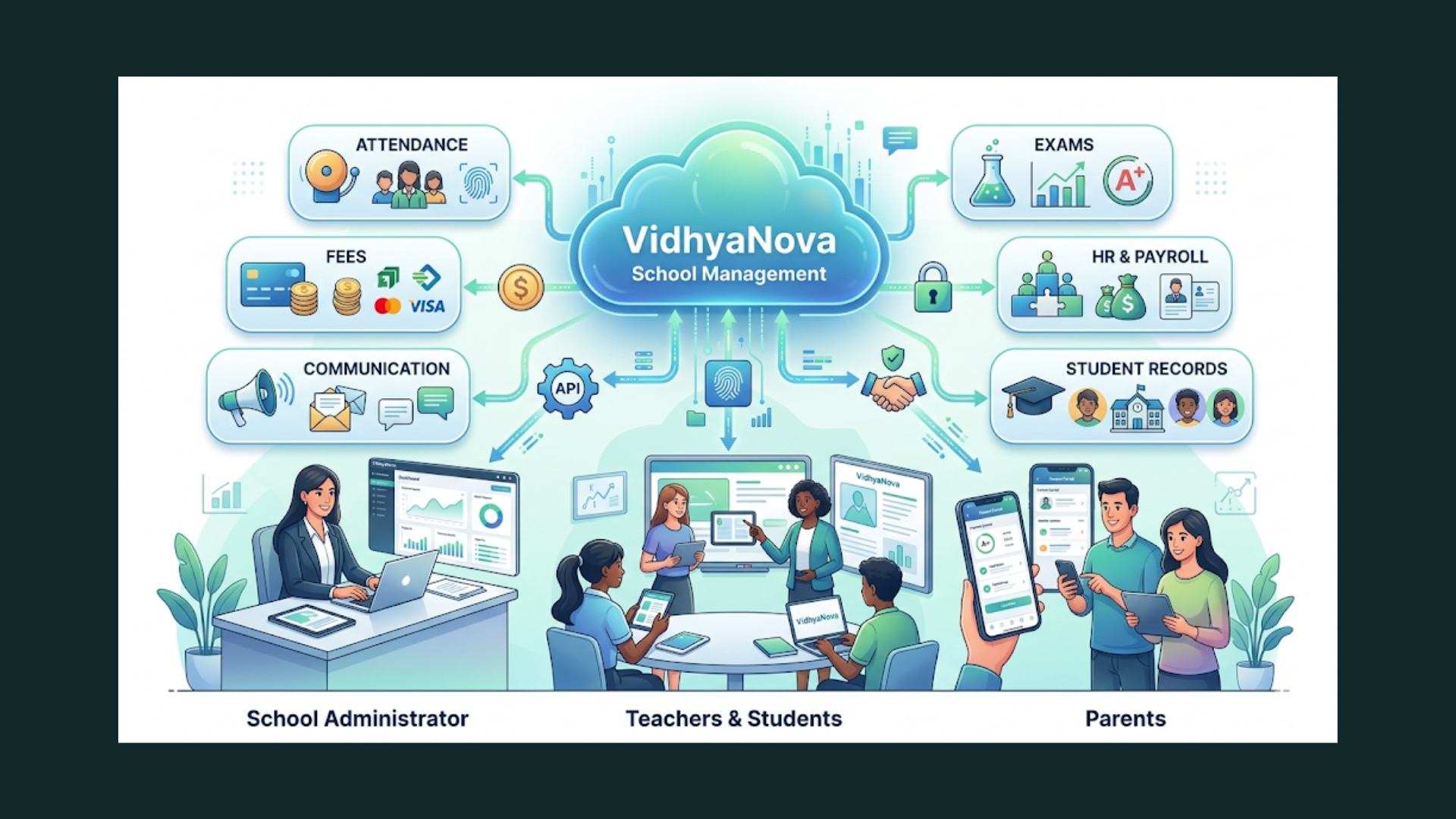
If you are exploring school ERP software and want a partner who understands Indian schools as well as global best practices, Vidyanova is built for that bridge. We focus on School Automation Software that keeps things simple but powerful.
Here’s what makes our product practical for administrators and IT teams.
- Comprehensive modules. From the student information system to fee management, attendance, HR, and learning management integration, Vidyanova covers core workflows.
- Cloud first approach. No messy servers, automatic updates, and secure backups. We manage infrastructure so your team can focus on education.
- Local understanding. Our features support fee structures, statutory requirements, and payment gateways commonly used in India and beyond.
- Open integrations. We offer APIs and standard connectors for LMS, biometric devices, and payment providers so systems work together.
- Hands on support. We work with your team during implementation and provide training materials, onboarding, and follow up sessions.
If you want to see the platform in action, Vidyanova offers free demos that walk through modules tailored to your school. You can also try pilot deployments with limited risk.
Checklist: Choosing the right online school platform
Here is a simple checklist you can use when shortlisting vendors.
- Does it offer a full student information system with secure role based access?
- Is there an attendance management system for schools with real time alerts?
- Can it automate school fee management with multiple payment options?
- Does it integrate with your LMS and payment gateway?
- Are backups and data encryption standard?
- How is user training and vendor support organized?
- Does the solution offer mobile friendly parent and teacher portals?
- Can you export data easily for audits or migration?
- Are analytics and reporting easy to customize?
- What are total costs including onboarding and any customization?
Simple before and after example
Imagine a 600 student K through 12 school using paper ledgers and spreadsheets. Here is a micro before and after to make it real.
Before: The accounts team spends three days at the end of the month reconciling cash and bank receipts. Parents call every morning with fee queries. Teachers spend time filling attendance registers and manually compiling monthly absence letters.
After: With cloud-based school software, online payments reduce cash handling. The system automatically posts receipts and generates reminders for overdue accounts. Attendance is taken on a tablet and parents receive instant SMS alerts. The accounts team now takes four hours to generate the monthly report and resolves exceptions rather than chasing routine entries.
Simple, but powerful. It frees staff to focus on students and parent communication becomes less reactive and more proactive.
Budgeting and procurement tips
Procurement can be tricky if your committee only looks at list price. Factor in these items so you don't get surprised later.
- Onboarding and training costs. A good vendor will include initial training in the proposal.
- Data migration. Exporting and cleaning historical records often needs a one time effort.
- Integration fees. If you need custom connectors to existing systems, ask about cost and timeline up front.
- Hardware needs. Tablets or biometric devices may be required for attendance or library management.
- Annual maintenance and support. Know what is included and what is extra.
FAQs
1. What is online school management software and how does it work?
Online school management software is a cloud-based platform that helps schools manage daily operations like attendance, fees, exams, and communication in one system. It centralizes data and automates workflows, allowing administrators, teachers, parents, and students to access information in real time from any device.
2. What are the key benefits of using a cloud-based school management system like VidhyaNova?
A cloud-based system like VidhyaNova offers benefits such as remote access, automatic updates, lower upfront costs, enhanced data security, and seamless scalability. It reduces manual work, improves transparency, and ensures better communication between schools and parents.
3. How secure is student data in a school ERP system?
Most modern school ERP systems use advanced security measures like data encryption, role-based access control, and regular backups. Reliable providers also follow compliance standards and conduct security audits to ensure sensitive student data remains protected.
4. How long does it take to implement a school management system?
Implementation time varies depending on the size of the school and the modules selected. Typically, a basic setup can take a few weeks, while a full ERP rollout with data migration and training may take a few months. Starting with a pilot program helps ensure a smooth transition.
Final thoughts
Moving to an online school management software is not a one time project. It is a change in how your school handles information and communicates. When you approach it methodically, the payoff is clear: less time on admin, more time for teaching, and better transparency for parents and regulators.
Start small if you need to. Pilot a module, measure results, then scale. If you bring staff and parents along with simple training and clear communication, adoption will be smoother than you expect.
Want to see how a cloud-based school solution could work for your school? Book a demo and let us walk through your workflows. Seeing your data flow in real time helps you decide quickly.
Helpful Links & Next Steps
- Vidyanova - Company Website
- Vidyanova Blog
- Book your free demo today
- Contact Us
- support@vidyanova.com
If you want tailored guidance, we can discuss your current processes and suggest a phased plan. Book your free demo today and we will walk through the exact modules that matter to your school.