School Attendance Management System: Automation Guide for 2026
This guide helps school leaders choose and implement smart attendance management in 2026. It argues automation saves teacher time, improves accuracy, enhances student safety and parental communication, and enables analytics. It outlines core components—data capture, storage/processing, notifications, analytics, and ERP integration—compares technologies (biometrics, RFID, face recognition, AI, QR/mobile and hybrids), and provides a phased pilot-to-rollout roadmap. Key themes include involving teachers, handling privacy and compliance, measuring KPIs and ROI, vendor evaluation, training, and maintenance. The purpose is practical, actionable advice that emphasizes pilots and measurable outcomes while avoiding vendor hype.
If you run a school, you already know attendance is more than just a register. It impacts funding, student safety, parental communication, and teacher workload. Over the years, attendance systems have evolved from paper registers and Excel sheets to cloud-powered, AI-enabled platforms. Today, solutions like Vidhya Nova are helping schools streamline attendance while integrating it seamlessly with broader school operations. In 2026, automation is no longer optional—it’s expected.
This guide explains how to choose and implement a smart school attendance management system, what technologies to consider, common pitfalls to avoid, and how to get measurable value quickly. I wrote this for principals, school administrators, teachers, and edtech decision-makers who want practical advice, not marketing fluff. Expect checklists, simple examples, and real-world tips I've gathered working with schools and tech teams.
Why automate attendance in 2026?
First off, why now? A few reasons jump out.
- Time savings. Teachers spend less time calling names and filling out registers, freeing up class time for teaching and student support.
- Accuracy. Automated systems reduce human errors and inconsistent recording, which helps with reporting and compliance.
- Real-time monitoring and safety. Get instant alerts when a student is absent or off-campus unexpectedly. That matters for student safety and parent trust.
- Better insights. Modern systems provide analytics, such as chronic absence patterns and correlations with academic performance.
- Parent engagement. Automated notifications keep parents informed, and most families prefer quick texts or app messages over phone calls.
I've noticed schools implementing automation often see immediate administrative relief. But without a clear plan, you can end up with a fragmented system that creates more work. So let's go step by step.
Core components of a modern school attendance management system
A smart attendance system for schools in 2026 usually contains several parts. Each plays a role in making attendance reliable and actionable.
- Data capture layer. This is where attendance is recorded, via biometric scanners, RFID gates, face recognition cameras, QR codes, or mobile apps.
- Processing and storage. The backend stores records, applies rules, and syncs with your school ERP attendance module.
- Notifications and communication. Automated SMS, email, or in-app messages to parents and staff.
- Analytics and reporting. Dashboards that show trends, at-risk students, and compliance metrics.
- Integration APIs. Connectors to your SIS, school ERP attendance module, learning platforms, and payroll systems.
Each component must be chosen and configured with your school's workflows in mind. Don't force teachers to change their entire routine overnight.
Types of attendance technology, with pros and cons
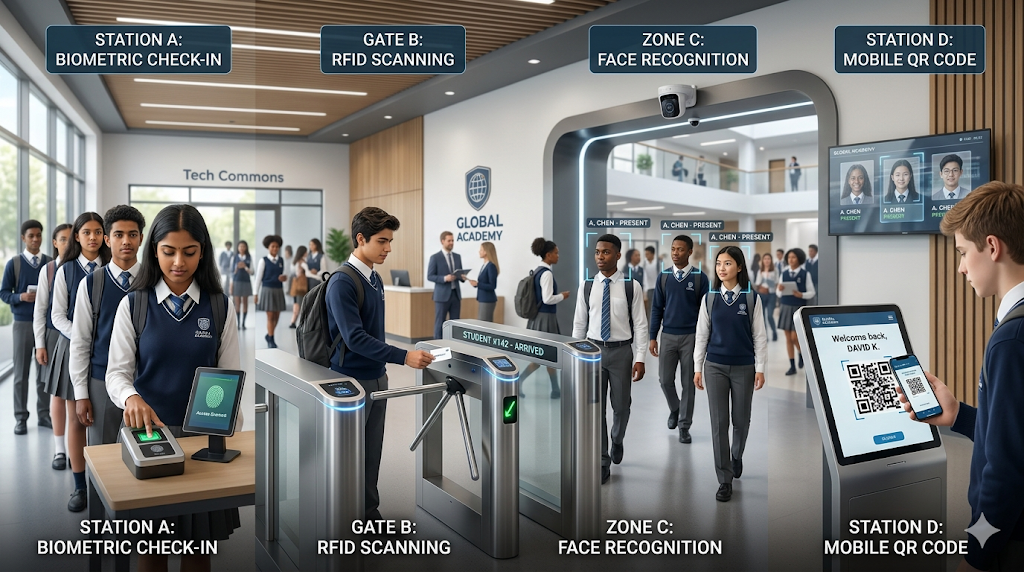
There is no one-size-fits-all. Choose tech based on school size, age groups, budget, campus layout, and privacy rules.
Biometric attendance
Biometric systems use fingerprints or fingerprints and palm scans to identify students. They're common and reliable for avoiding buddy-punching (when one student clocks in for another).
- Pros: Accurate, reduces fraud, quick for steady use.
- Cons: Hygiene concerns, ongoing maintenance, privacy regulations in some regions, hardware costs.
Tip: For younger children, manage queues and supervision during fingerprint checks. In my experience, pairing biometric readers at classroom doors works better than a single central kiosk during peak entry times.
RFID attendance
Students carry cards or tags that get scanned at classroom or gate readers. RFID is non-intrusive and familiar.
- Pros: Fast, contactless, works well for bus tracking and entry gates.
- Cons: Students forget or lose cards, risk of proxy use if cards are shared.
Simple fix: Combine RFID cards with random teacher checks or use short-range readers that require proximity to discourage passing cards around.
Face recognition attendance
Face recognition can automate large-scale capture as students walk past a camera. It’s quick and contactless.
- Pros: Contactless, scaled capture, minimal student action.
- Cons: Accuracy varies with lighting and masks, higher privacy scrutiny, potential bias in algorithms.
Note: In my experience, good lighting and camera placement matter more than vendor promises. Run a small pilot to test accuracy with your student population before wide rollout.
AI attendance tracking
AI can do more than identify faces. It can combine multiple inputs, predict absenteeism, and flag irregular patterns. AI attendance tracking is an umbrella term that describes systems that apply machine learning to attendance data.
- Pros: Identifies chronic absence trends, reduces false alerts, supports early interventions.
- Cons: Needs good quality data to work well, models require tuning, and results must be interpreted carefully.
Don't expect AI to be magic. Use it to augment decisions, not replace human judgement. I've seen schools get great value when they use AI to prioritize outreach rather than to automate sensitive decisions.
QR codes and mobile check-in
Teachers or students scan a QR code with a smartphone app. Good for small schools or field trips.
- Pros: Low cost, flexible, works with BYOD programs.
- Cons: Students could screenshot codes, and phone availability can be inconsistent for younger kids.
Quick example: On a field trip, assign a staff member to scan students' QR codes as they board the bus. It’s faster than paper and creates an instant digital log.
Hybrid approaches
Most modern deployments are hybrid. For example, RFID at the gate, face recognition for building entry, and manual teacher confirmation for class periods. Hybrid systems give redundancy and flexibility.
I've noticed that mixed systems often provide the best balance between accuracy and cost. They let you phase in automation without disrupting routines.
Integration with your school ERP attendance module
Attendance is useful only if it connects to the rest of your systems. The school ERP attendance module should be the central record, so choose a solution that syncs cleanly.
Consider these integration points.
- Real-time sync. Attendance updates should update the ERP as they happen, or at least every few minutes.
- Two-way updates. If a teacher marks an attendance correction in the ERP, the attendance system should accept it and resolve duplicates.
- APIs and middleware. Look for RESTful APIs and standard data mappings. Ask vendors for documentation and sample scripts.
- Data governance. Decide who can update attendance, and how corrections are logged. Audit trails are essential for audits and disputes.
Practical tip: Before buying, request a sandbox demo where your ERP can connect to the demo system. It avoids surprises during rollout.
Implementation roadmap: from pilot to full rollout
A phased approach saves time and reduces risk. Here is a simple timeline I've used with schools, scaled to a typical term or semester.
- Discovery and requirements, 2 weeks. Interview teachers, administrators, bus managers, and IT. Map current workflows. Identify pain points and must-have features.
- Pilot selection, 2 weeks. Choose one grade, building, or bus route for the pilot. Keep the pilot small and measurable.
- Installation and setup, 1-3 weeks. Deploy hardware and connect to the school ERP attendance module in the pilot zone. Train pilot teachers and staff.
- Pilot run, 4-6 weeks. Collect data, measure uptime, get feedback, and adjust settings like notification thresholds.
- Evaluation and iteration, 1-2 weeks. Review metrics and feedback. Fix issues. Decide whether to expand.
- Rollout in phases, 1-3 months. Expand by grade or building in waves. Keep support staff on hand for the first week of each wave.
- Ongoing optimization. Use analytics to track chronic absence, teacher adoption, and system performance, and iterate.
One realistic expectation: plan for two to three months from pilot to full rollout for mid-sized schools, longer for large districts. Trying to do everything at once is a common mistake I've seen. It creates resistance and tech headaches.
Common mistakes and pitfalls
Avoid these traps. They cost time and erode trust.
- Skipping teacher input. Teachers are the end users. If they feel imposed upon, adoption stalls. Involve them early and often.
- Ignoring privacy concerns. Parents and regulators care about biometric and face data. Be transparent and follow local laws.
- Buying the flashiest tech first. Fancy features look good, but if the basics fail, the system becomes noise. Prioritize reliability over novelty.
- Poor integration planning. A system that does not sync with your school ERP attendance module creates extra data entry and errors.
- No plan for edge cases. Students arriving late, field trips, substitute teachers—prepare workflows for these scenarios.
A quick aside: during one rollout I saw, the vendor installed biometric readers at the main gate only. Students still missed first period because the teachers were recording attendance differently. The lesson? Think end-to-end.
Data privacy, security, and compliance
No topic causes more worry than privacy. If you're considering biometrics or face recognition attendance, you need clear policies.
- Know the law. Some regions restrict biometric data collection. Consult legal counsel and local education authorities.
- Minimize data. Store only what you need. Consider hashing biometric templates rather than keeping raw images.
- Use encryption. Encrypt data at rest and in transit. Require strong authentication for admin access.
- Clear consent. Get parental consent where required and give opt-out alternatives.
- Retention policies. Define how long attendance and biometric records are kept and how they are disposed of.
In my experience, transparency is a huge trust builder. Share a one-page privacy summary with parents. Explain how the system protects students and what happens if data is compromised.
Measuring success: KPIs and ROI
Automation is an investment. Track outcomes so you can justify it to your board or stakeholders.
Key metrics to monitor:
- Teacher time saved. Measure minutes per class saved on attendance, multiplied across classes and staff.
- Accuracy improvements. Track mismatches between manual and automated records during the pilot.
- Reduction in chronic absenteeism. Monitor trends before and after automation and correlate with interventions.
- Parent engagement. Track open rates and responses to automated messages.
- Operational impacts. Fewer late starts, quicker bus roll calls, and reduced administrative workload.
Calculate ROI not just in dollars but in teacher hours and improved student outcomes. I’ve helped schools show that saving 15 minutes of class time per day for 20 teachers quickly adds up to hundreds of teaching hours per year.
Vendor evaluation checklist
When you evaluate vendors, keep a consistent checklist. This helps you compare apples to apples.
- Integration capabilities. Does the vendor integrate with your school ERP attendance module via documented APIs?
- Hardware options. Can they provide biometric, RFID, or face recognition components, and are those hardware components field-tested?
- Data security. Ask for encryption standards, SOC reports, and data residency options.
- Support and SLAs. What uptime does the vendor guarantee, and what's their support model during rollouts?
- Customization. Can rules, alerts, and notifications match your school's policies?
- Pricing model. Is it per student per month, per device, or a one-time fee plus maintenance?
- References and pilots. Ask for references from similar schools and a pilot program before buying.
One practical step: score each vendor against these criteria and weight the most important items for your school, such as integration and privacy, higher than bells and whistles.
School ERP software has become an essential tool for modern educational institutions in India. From managing admissions and attendance to handling fees and communication, ERP systems simplify complex school operations. This guide explores the pricing, key features, and implementation process of School ERP Software in India to help institutions make informed decisions.Change management and training
Technology often fails because people don’t change. Even the best automated attendance system needs thoughtful adoption planning.
- Champion model. Identify teacher champions and admin champions who can promote the system and train peers.
- Hands-on training. Short, practical sessions beat long theoretical ones. Show teachers how to fix common issues fast.
- Clear support channels. Provide a shortcut to help, like a dedicated phone line or chat during rollout weeks.
- Feedback loops. Weekly check-ins during the first month are golden. Fix small annoyances immediately.
Quick anecdote: I once recommended a one-page cheat sheet for teachers showing steps for late arrivals, subs, and field trips. Simple, printable, and used daily. It reduced support tickets by half in the first month.
Maintenance and long-term support
Think beyond launch. Plan for updates, hardware replacement, and ongoing training.
- Device lifecycle. Budget for replacing scanners and cameras every five years, or sooner if usage is heavy.
- Software updates. Schedule non-disruptive updates outside school hours.
- Data audits. Periodically audit attendance data quality and fix drift in AI models if you use them.
- Service contracts. Negotiate clear maintenance terms and response times with the vendor.
Maintenance often gets deferred until something breaks. My advice is to make a small annual budget line for it. It saves you bigger costs later.
Real-world examples and simple use cases
Let's keep this practical. Here are three compact examples you can imagine implementing within a term.
Example 1: Small urban school, hybrid system
Setup: RFID cards for gate entry, teacher app for period attendance, and SMS alerts for unexplained absences.
Result: Faster morning entry, immediate alerts to parents, and fewer late marks. The school gradually added bus RFID readers after noticing high accuracy at the gate.
Example 2: Large campus with safety emphasis
Setup: Face recognition at main entry points for senior students, RFID tags for younger children, integration with the school ERP attendance module to support daily reporting.
Result: Quick roll calls and better emergency evacuation logs. The school kept a manual opt-in for face recognition to respect parental choice.
Example 3: District rollout focused on analytics
Setup: Centralized AI attendance tracking that aggregates data across schools and flags chronic absence risk. Schools used the insights to prioritize outreach.
Result: District leaders could allocate intervention resources where they mattered most, and early engagement reduced long-term absenteeism rates.
Cost considerations and budgeting tips
Costs vary widely depending on scale, hardware choices, and integration needs. Here are some budget items to consider.
- Hardware. Biometric readers, RFID gates, cameras. Prices range from economical to premium depending on features.
- Software license or subscription. Per student per month is common for cloud services.
- Integration and setup fees. Scripting, API work, and middleware if your ERP needs custom connectors.
- Training and change management. Workshops, trainer fees, and time for staff.
- Renewals and maintenance. Annual fees for software updates and hardware servicing.
Tip: Negotiate a phased payment tied to milestones, such as successful pilot, integration completion, and full rollout. Vendors are usually open to this because it shows commitment from both sides.
Future trends for attendance automation beyond 2026
Looking ahead, a few trends are shaping what smart attendance systems will look like.
- More intelligent edge computing. Cameras and sensors will process data locally to reduce latency and privacy risks.
- Context-aware AI. Systems will understand absence reasons better by connecting attendance with health, transport, and academic data.
- Greater interoperability. Open standards will make it easier for schools to swap vendors without losing historical records.
- Focus on inclusivity. Solutions will better handle students with special needs and provide non-intrusive alternatives.
Don't chase every new feature. Focus on systems that update frequently and keep an eye on vendor roadmaps. If they publish clear plans for privacy, edge processing, and ERP integrations, that's a good sign.
FAQs
1. What is a smart school attendance management system?
A smart school attendance management system is a digital solution that automates student attendance using technologies like biometrics, RFID, face recognition, or mobile apps. It helps schools track attendance in real time, improve accuracy, and integrate data with their ERP systems for better management and reporting.
2. Which attendance technology is best for schools?
The best attendance technology depends on your school’s size, budget, and requirements.
- Biometric systems offer high accuracy
- RFID cards are cost-effective and easy to use
- Face recognition is fast and contactless
- QR/mobile-based systems work well for smaller setups
Many schools prefer a hybrid approach to balance cost, accuracy, and flexibility.
3. How does attendance management integrate with school ERP software?
Attendance systems integrate with school ERP software through APIs or direct syncing. This allows real-time updates, centralized data storage, automated reports, and seamless communication with modules like fees, academics, and parent notifications.
4. What are the key benefits of automating school attendance?
Automating attendance helps schools:
- Save teacher time and reduce manual work
- Improve accuracy and eliminate errors
- Enable real-time tracking for student safety
- Increase parent engagement through instant alerts
- Provide analytics to identify absenteeism patterns
Final checklist before you sign
Before you choose a vendor and commit budget, run through this quick checklist.
- Have you mapped current workflows and pain points?
- Did you involve teachers and parents early?
- Is the solution compatible with your school ERP attendance module?
- Have you tested the tech in a pilot with real students?
- Is there a clear privacy policy and data protection plan?
- Are support, training, and maintenance terms clear?
- Do you have a phased rollout and change management plan?
Answering yes to these reduces the odds of surprises and speeds up adoption.
Conclusion
Implementing a smart attendance system for schools is both a technical and human challenge. The technology is mature enough in 2026 to deliver real benefits, from time savings to better student outcomes. But success depends on planning, teacher involvement, privacy safeguards, and solid integration with your school ERP attendance module.
If you're starting this journey, start small, prove value, and then scale. Keep the process human, and don't let technology dictate your school's culture. Use automation to support educators, not replace them.
Helpful Links & Next Steps
- Vidhya Nova
- Vidhya Nova Blog
- Contact Us
- support@vidyanova.com
Ready to explore a smart attendance solution that integrates with your systems and respects privacy? Book your free demo today: Book your free demo today.